Wiki › Chat and emotes
Chat and emotes
Press Enter to talk (on a phone, tap the speech bubble by the bars). What you type goes out the way you typed it: <3 stays <3, and the people reading it see a little heart.
Channels
- The tabs All, Group, Guild and System sort what you read, and you talk to the tab you are on. Tab changes the channel while you type.
- On All you talk to the people near you: about forty tiles, in the same place (out in the open world, or inside the same town or floor). Your line shows grey for them. The gear on the tabs (or Settings) can make All talk to everyone instead, and choose what All shows.
- Point at the chat (or press Enter) and it opens: the whole history of the tab, to scroll back through. Left alone it shows the newest lines and lets them fade.
- While you type it grows: taller, with larger letters on a darker ground (and wider on a wide screen), so what the others say is easy to read. Esc or Enter puts it back.
Commands
| You type | It does |
|---|---|
/all message (or /a, /world) | talks to everyone |
/n message (or /near) | talks to the people near you, from any tab |
/g message (or /group, /p, /party) | talks to your group |
/gu message (or /guild) | talks to your guild |
/w name message (or /whisper, /tell, or @name message) | whispers to one player |
/me does something | an emote of your own: the people near you read "* Brannoc does something" in the chat, and it shows over your head |
/wave, /bow, /dance and the rest | an action emote (below) |
/emotes | lists every emote in the chat |
/yield | gives up a duel |
Any other /word sends nothing and tells you the commands instead.
Emote icons
Type a code and the chat and the speech bubble over your head show a small picture in its place. The words you typed are what is sent, so nothing is lost: the picture is only how it is shown. A code is a picture at the edge of a word: I <3 you shows a heart, x<3 stays as it is.
The smiling face by the chat box opens a picker: click a picture and its code goes in where you are typing. Under the pictures are the action emotes (below): click one and your character does it. Esc closes the picker first, then the chat box.
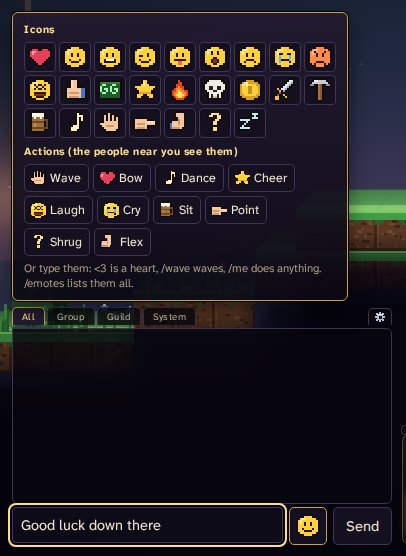
| Code | Shows |
|---|---|
<3 or :heart: | a heart |
:), :-) or :smile: | a smile |
:D, :-D or :grin: | a big grin |
;), ;-) or :wink: | a wink |
:P, :p, :-P or :tongue: | a tongue out |
:O, :o, :-O or :wow: | surprise |
:(, :-( or :sad: | a sad face |
:'( or :cry: | tears |
>:( or :angry: | an angry face |
xD, XD or :lol: | laughing |
:+1: or :yes: | a thumbs up |
:gg: | "good game" |
:star: | a star |
:fire: | a flame |
:skull: | a skull |
:coin: or :gold: | a gold coin |
:sword: | a sword |
:pick: | a pickaxe |
:ale: | a mug of ale |
:music: | a note of music |
:wave: | a waving hand |
:point: | a pointing hand |
:flex: | a strong arm |
:?: or :shrug: | a question mark |
:zzz: | sleepy |
Action emotes
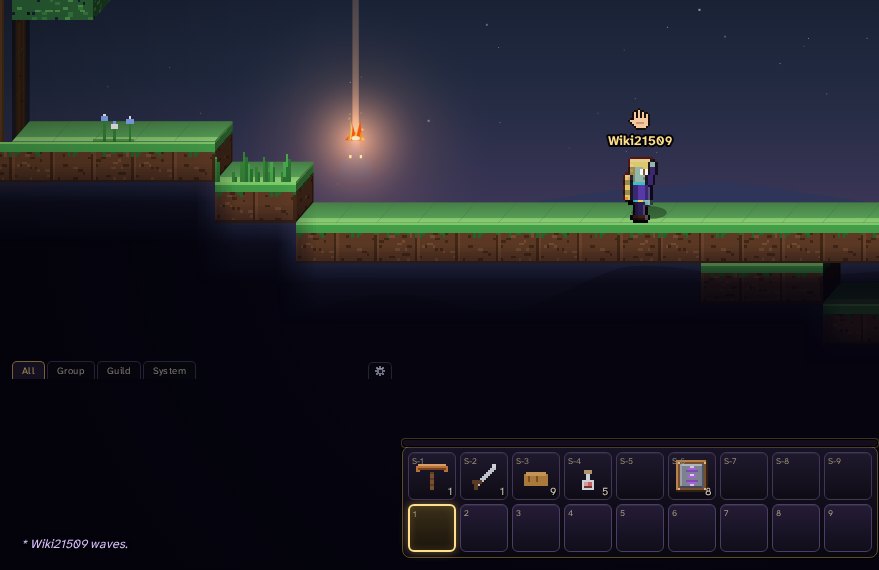
Type one (or pick it in the picker) and your character does it, with its picture over your head for two seconds, and the chat says what you did (for /wave: "* Brannoc waves."). Everyone near you sees it, out in the open world, in a town and on a floor; those further off, or somewhere else, do not. Move and the pose ends; /sit keeps you sitting for eight seconds, or until you move.
| Emote | Your character | Over your head |
|---|---|---|
/wave | waves hello | a waving hand |
/bow | bows deeply | a heart |
/dance | dances a jig | a note of music |
/cheer | jumps for joy | a star |
/laugh | laughs out loud | a laughing face |
/cry | sheds a tear | tears |
/sit | takes a seat | a mug of ale |
/point | points the way | a pointing hand |
/shrug | shrugs | a question mark |
/flex | shows their strength | a strong arm |
Emotes keep the chat's pace: one line or emote at a time, and if you go too fast you are asked to slow down. A player who is muted cannot use them either.
What goes through
The server passes on what you type as it is, with <, > and every letter, and takes out only what would hide words or turn them around: control characters (a letter keeps its line breaks), the invisible marks that reverse or hide text, zero-width spaces, and accents piled more than three deep on one letter. The same goes for group, guild and whispered chat, letters, guild mottos and announcements. A line is at most 140 characters.
Announcements
News for everyone (a rift tearing open, an event starting, a boss slain, a word from the admins) comes as a small card on the left of the screen, under your portrait and your group: it says who it is from, stays six seconds, and up to three show at once, the newest on top. Click a card to put it away early, and point at one to keep it while you read. On a phone one card shows at a time: near the bottom, over the buttons, with the phone held upright, and along the top held sideways; a card waits its turn while an achievement shows there. Every announcement stays in the chat as well (All and System).