Wiki › The world map
The world map
The map (M) is one map of the whole world, the Atlas. In a town, M opens the town's own map instead, and its World map button opens this one (Towns).
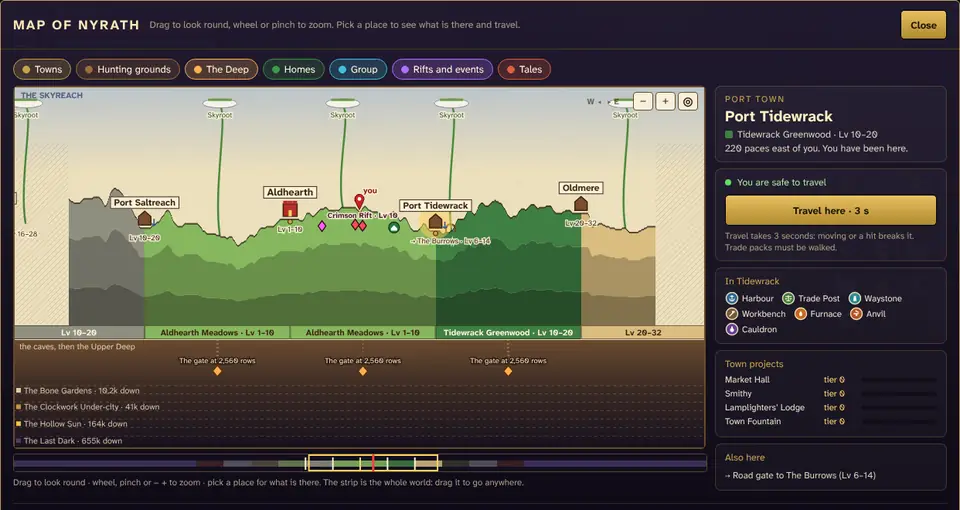
Reading it
- Three bands, top to bottom. The Skyreach with its Skyroots (climb one to get up there, see The Skyreach). The land, in each region's colours, with a ribbon under it that names the region and its levels (greyed when it is above your level). And the Deep, with its bands from the Bone Gardens to the Last Dark (The bands below). The Deep is drawn on a squeezed scale, so every band fits.
- Inked and pencil. Land you have walked is inked: its real hills and valleys, in its colours. Everywhere else is still pencil, hatched, with "the Wane" written over it.
- What is on it: towns (a castle for Aldhearth, an anchor for a port, a gold dot when you have been there, a "?" when you have only seen it from afar), the road gates to the hunting grounds beside their home towns (The Wild Road), your Homes and the Homes that let you in, your group, open rifts and events, the marks of your tales and an old map's circle (Tales and treasure), your delve gates and your stake down in the Deep (Delvers), and you (the red pin).
- You are the red pin. Under the land it says how far down you are (you · 412 down), and so does the card beside the map when nothing else is picked.
- The chips along the top show or hide each kind: towns, hunting grounds, the Deep, Homes, group, rifts and events, tales. The game remembers your choice.
Moving round
- Two maps. The buttons above the map choose between Round you and The whole world. Under the ground, in the Deep or up in the Skyreach the map opens on Round you; on the surface, on the whole world.
- Round you is the land where you are, drawn as the minimap draws it and with everything the minimap marks, as big as the map. Drag it any way, zoom with the wheel, a pinch or − and +, and ◎ goes back to you. The ruler down its left side names the layers (sky, surface, caves, deep caves, the Deep) and counts the rows down from the ground's edge where you stand; the label on you says how far down you are; the nearest town off each edge is written at the bottom with how many paces away it is.
- The layers, beside the whole world, list the Skyreach, the surface, the caves (10 to 70 rows down), the deep caves (70 rows down to bedrock) and the Deep, with You on the one you are in and how far down.
- On the whole world, drag to look east and west. The mouse wheel, a pinch on a phone, or the − and + buttons zoom. ◎ goes back to where you are.
- The strip under the map is the whole world, the regions in their colours and every town you know as a tick. The gold frame is the part on the map, and the red line is you. Click or drag on the strip to look anywhere.
- When a tale's place or an old map's circle is off the part you are looking at, an arrow at that edge of the map points to it, with how far it is from you.
The card: what is there, and what you can do
Click anything on the map and the card beside it (under it on a phone) says what it is:
- A town: its region and levels, how far it is, what you can find in it, its four town projects with their tiers, its road gates and the delve gates near it, and Travel here.
- A road gate: the hunting ground beyond it, its levels, and Travel to its camp.
- A Home: Go Home (or Go there, for a Home that lets you in), unless its Home Stone is cold.
- A delve gate or your stake: how far down it is, and Delve here (with its waystone fee, if there is one).
- Someone in your group: where they are, and Travel to them (they stand still for 30 seconds of channel; see Guilds and groups).
- A rift, an event, a tale's mark, a Skyroot: what it is and how far.
With nothing picked, the card says where you are and whether you can travel.
Every list the map had is still under the Atlas: the Wild Road, the towns, your Homes, the Deep, your group, and the key to the marks.
Your pins
Mark places of your own: an ore you will come back for, a cave, a spot by the sea. Up to 30 pins, each with a note and one of six colours, kept with your character.
- 📍 Pin where I stand (by the chips over the map) puts a pin where you are, on the land, under it or deep in the Deep, and opens its card with the note ready to write.
- Place a pin, then a click on the map: a pin there, on the land's surface, or at that depth if you click in the Deep. A drag still drags.
- Pick a pin for its card: change its note or colour, or delete it. The Your pins chip hides or shows them all.
- The minimap shows your pins as little flags in their colours, and an arrow at its edge for one beyond it.
Fast travel and the 10 seconds
Every kind of fast travel (a waystone to a town or a camp, the road Home, a delve gate, travel to your group) has the same rule: nothing may have hurt you for 10 seconds, and you wait as long after you log in. When you have to wait, the game says why in so many words:
On the map that is a red box over a bar that drains, and the travel button says Travel in 6 s until it opens again on its own. A hit while you are already travelling breaks the travel, and says so too. The trip itself takes 3 seconds of standing still. Trade packs have to be walked. The arena still wants 30 seconds since your last hurt, and a duel 15.
The minimap
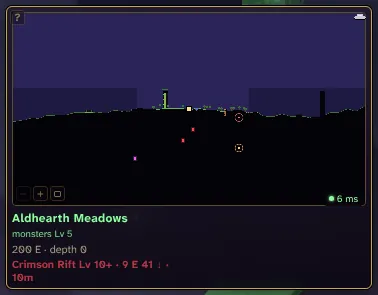
- Bigger and smaller. The square button on the minimap (or ,) goes from small to large (twice the size) to extra large (three times the size, with every tile two pixels so things are easier to see, and the towns' names on it), and back. Extra large needs a screen at least 1100 by 680, and is not on phones.
- The wheel and a drag. The mouse wheel over the minimap zooms it. Drag the minimap to look round: an arrow on its edge points back at you, and the ◎ by its buttons (or walking on a little) brings it back. A drag does not open the map.
- The ground and the layers. Ground you have not seen is drawn in its layer's colour, brown for soil, grey for the caves and violet for the deep caves, so the tunnels you have seen stand out dark against it (it shows nothing you have not found). You are an arrow that points the way you face. The bar on the right edge is the five layers, with a pointer on yours.
- Zoom. − and + (or - and =) zoom out and in: three steps, from half as much land to twice as much. The game remembers both.
- Tab opens the land round you in a window over the game, the same picture as Round you on the map: the layers' ruler, how far down you are, the towns' names. Tap Tab and it stays until Tab or Esc; hold Tab and it goes when you let go. Drag to look round, zoom with the wheel or − and +, ◎ goes back to you. You keep walking while it is open, and it remembers its zoom.
- Remembered land. Land you have been near but that is not loaded right now is drawn from memory, a little dimmer. Land you have never been near is hatched. Black is ground you have not lit yet.
- On a phone the small minimap has only the size button; make it large for − and +. Tapping the minimap opens the map.
- Clicking the minimap opens the map, and its ? says what the marks mean.
- How deep you are. Under the land, the minimap's upper right corner says how many rows down you are (412 down), counted as the Book of Delvers counts. A ★ beside it means you are as deep as you have ever been. See Digging deeper.