Wiki › Tools and elevators
Tools and elevators
Elevator blocks that carry you up a shaft in one step, pickaxes that dig a line, a square or a wide circle at every swing, a charge that cracks a rock face open for you, a suit you can swim through lava in, and doors that show where they go and say why when they can't.
Every swing of a pick shows its work: the block cracks in four stages, one more with each blow, it shakes, chips fly in its own colours, ore glints, and when it gives way it bursts and the ore flies to you (Effects and animation).

Elevator blocks
| Item | Made at | From | Makes |
|---|---|---|---|
| Elevator block | Anvil | 3 iron bars, 2 copper bars and a crystal | 2 |
- Put them down like any block (hold one and right click), one straight above the other, at most 48 rows apart: at the top and the bottom of a shaft, or one on every floor of your home.
- Ride up: stand on one and press Jump (Space or W). In a blink you stand on the next elevator block straight above. Ride down: stand on one and press S. The line at the bottom of the screen says which way you can go.
- On a phone, standing on one, the JUMP button reads ▲ UP when there is a block above to ride to, and a small ▼ DOWN button comes up over ACTION when there is one below.
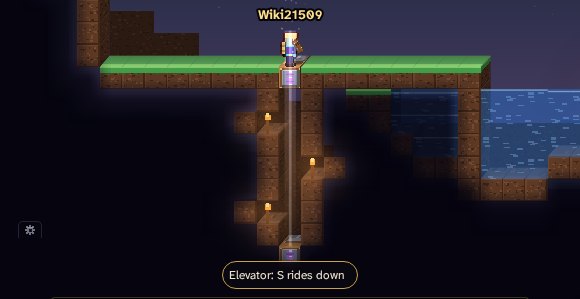
- The block you ride to needs two free tiles over it to stand in (nothing solid, no lava, no fire).
- The way between must be open: air, ladders, platforms, water. In ground you may build in (your Home's land, or one whose owner lets you build), built floors don't stop it either, so one shaft serves every storey. Natural rock stops it, even there: dig the shaft open first. On open ground every solid block stops it.
- Never through a seal of the Deep, a kept place (a protected landmark, a delve gate's chamber), someone else's ground or a town's ground.
- A shaft from the surface: the open land grows its top three rows back over bare holes (see the healing skin), but never over a shaft with an elevator block on top of it, nor over the two tiles on top of one. So set your top block in the ground's top three rows (or line them with ladders) and the shaft stays open.
- When a ride can't go, your chat says why and you stay where you are. With no block to ride to, Jump is just a jump.
- A ride at most every 0.4 seconds.
- On open ground elevator blocks fade after 2 hours like anything you build there; on your Home's land they stay.
Area picks
An area pick digs the block you swing at and the blocks around it, all at once. Each swings a little slower than the plain pickaxe of its metal, and each digs what that pickaxe digs.
| Pick | Digs at a swing | Digs like | Made at | From |
|---|---|---|---|---|
| Broad pick | 3 in a line: the block and the one either side of it, across your dig | a copper pickaxe | Anvil | 6 copper bars and 2 sticks |
| Tunneller’s pick | 2 in a tunnel: the block and the one over it (under it, when you dig down) | an iron pickaxe | Anvil | 5 iron bars, 3 copper bars and 2 sticks |
| Quarry pick | 3×3 | an iron pickaxe | Anvil | 8 iron bars, 4 copper bars and 2 sticks |
| Mythril excavator | 3×3, and it reaches a tile farther | a mythril pickaxe | the Master Forge in Aldhearth | 8 mythril bars, 4 iron bars, 2 crystals and a Jewel of Ascent |
| Delver’s excavator | 5×5 without its corners (21 blocks), and it reaches a tile farther | a starsilver pickaxe | the Master Forge in Aldhearth | 8 starsilver bars, 4 mythril bars, 2 crystals and a Jewel of Ascent |
| World-breaker | 5×5 without its corners, a band's rock too; it reaches a tile farther | an embersteel pickaxe | Anvil | 10 embersteel bars and 3 voidglass shards |
- Across your dig: the Broad pick's line turns with you. Dig sideways and it takes the block over and the block under; dig up or down and it takes the blocks left and right. Three tall when you tunnel, three wide when you sink a shaft.
- Natural ground only: dirt, sand, stone, ores, snow, ice, leaves, the Deep's rock. What someone built (planks, bricks, glass, chests, doors, stations) is never part of the area, and a swing at something built digs only that block.
- Only where you could dig it yourself: each block of the area must be one your pick could dig, and nothing goes in a town, in someone else's ground, in a kept place or in a dungeon's walls.
- A band's rock (the seven bands below the Deep's first 10,240 rows, their seals too) is part of the area only for the World-breaker, and only where your pick temper lets you dig it (see Might and temper). Every other area pick digs a band's rock one block at a time, as a plain pickaxe does.
- Area or one block: press E to switch your area picks to one block at a time and back (change the key in the settings, O). The mark over the right of your hotbar says which, AREA 3X3 · E or ONE BLOCK · E: click it to switch too. On a phone the mark sits at the left end of the hotbar and says TAP TO SWITCH. Your choice is kept.
- Aiming: with a mouse, a thin outline over the rock shows the blocks your next swing will take.
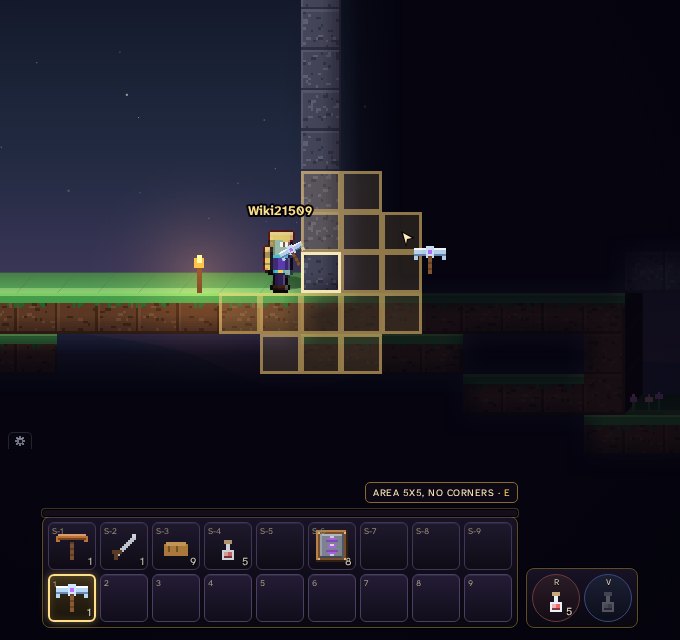
- What an area pick digs drops where it was, kept for you (and your group) for 15 seconds.
The miner's charge
| Item | Made at | From | Makes |
|---|---|---|---|
| Miner’s charge | Workbench | 4 sand in the corners, 4 charcoal at the sides and a copper bar in the middle | 20 |
No blast powder in it: charcoal, sand and a copper cap, not enough to hurt anyone, just enough to make the rock reconsider.
- Hold it and right click to throw it where you point (on a phone ACTION throws it at the nearest Grown, or ahead of you). It flies and bounces like a bomb.
- 1.5 seconds later it bursts and breaks the natural ground of the 3×3 around it, up to nine blocks. Lying on a floor it bursts into the floor: the block under it, the blocks either side of that and the three below them. Each block breaks as your best pickaxe (and your pick temper) would dig it; what your pickaxe couldn't dig stays.
- What it breaks is yours: it drops where it was, kept for you (and your group) for 15 seconds.
- It harms nobody: not you, not other players, not the Grown.
- It breaks only what a swing at natural ground would: never anything built, never a band's rock or a seal, nothing in a town, in someone else's ground, in a kept place or in a dungeon's walls.
- One throw every half second. When many people throw charges at once, the world shares them out evenly and each thrower waits their turn: past yours a throw waits a moment ("The ground is still ringing from the last charges"), and the charge stays in your bag. Nobody can keep everyone else waiting.
The Emberward suit
| Item | Made at | From | Armour |
|---|---|---|---|
| Emberward suit | Anvil | 6 embersteel bars, 16 ember dust and 8 basalt | 5 |
Embersteel plates over a lining of ember dust and basalt felt: body armour for the Ember Sea and the lakes of the Deep.
- Lava does you no harm while you wear it, and never sets you alight, and you swim in lava as in water.
- Fire, burning, flame jets and steam vents do half.
- Its armour is low (5, a copper suit's): wearing it costs you your best plate, so put it on for the crossing.
- Lava wears it: a point a second while you are in lava, 600 points from new, so about ten minutes of lava. It breaks like any armour, and then lava burns again: repair it at any anvil.
- Others see it on you, ember red, and a pale ring around you while you swim.
Doors
How to place a door, step by step
- Make one: 6 planks at a Workbench (two wide and three high in the grid) make a door.
- Be level 3 (or past the tutorial's building step). Before that the door says so.
- Find a doorway: two free tiles, one above the other, with solid ground under them. Not in a town or a port (they are protected), not in someone else's ground, not in a kept place, and not on the land a town grows back around it: more than 90 columns from the centre of Aldhearth or any town, 82 from a port's. Under the land, in the Deep, that ring is gone.
- Hold it (put it on your hotbar and pick it). Its ghost follows your pointer. You needn't point exactly: point at the floor where it should stand, at the tile just over the floor, or at head height, and the ghost finds the spot.
- Gold means it fits. Red means it doesn't, and says why over it: Needs two free tiles, one above the other, Needs solid ground under it, Too close to Aldhearth: the land here grows back, Someone is in the way, Not in someone else's ground, Towns are protected, A place kept as it was, Too far away, You can place doors from level 3.
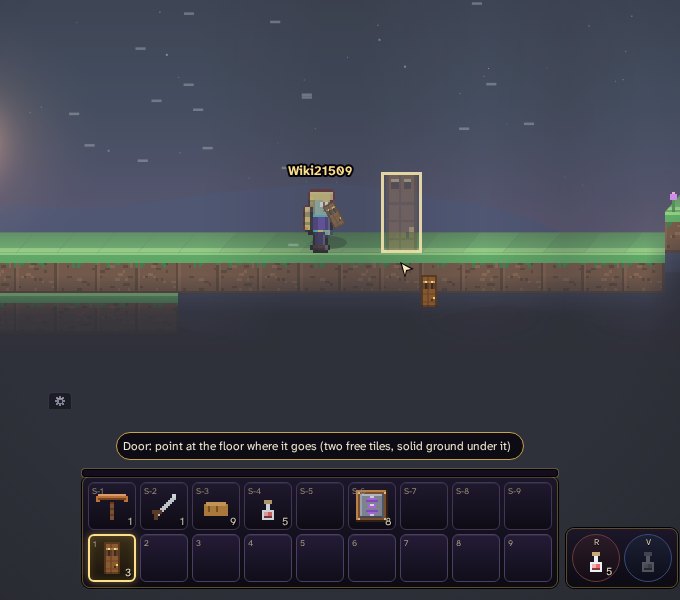
A door in hand out in the meadows: its ghost stands on the floor where you point, gold, so it fits 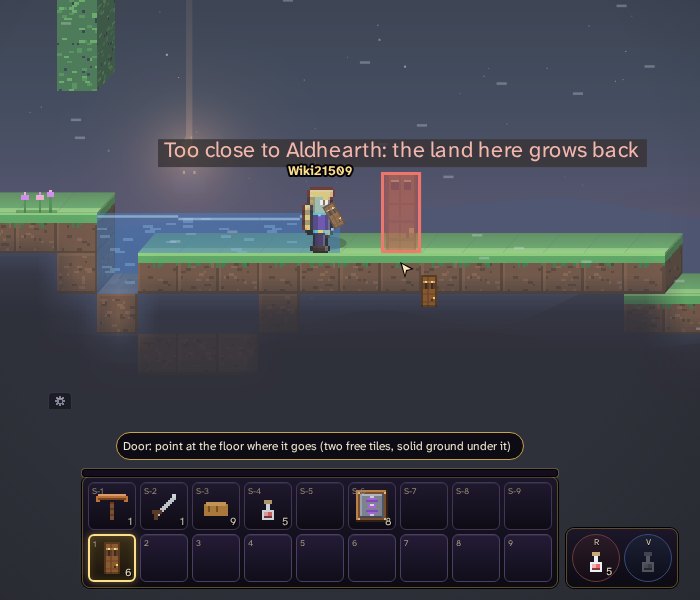
The same door by Aldhearth's walls: red, and the reason over it, too close to the town, where the land grows back - Right click to put it up. When it can't go, the reason shows on the spot and in your chat.
- On a phone, tap the spot (or press ACTION facing it). With a door in hand a tap never digs: when the door can't go there, it tells you why.
The door's tooltip in your bag says the same, in short.
Opening and shutting
- Right click a door, or press F by it. Your own door's menu has Open (or Close) and Who may open it...: you and your group always may, and there you add other people by name, or leave it unlocked for everyone.
- A door you may open opens the moment you click: you don't wait for the world to answer. If it was locked to you after all, it shuts again at once.
- A door with emberwire at it opens while the wire is warm: see Emberwork.